Your pace. Your next challenge.
Learn through explanations and examples shaped by your lesson, learning context and answers. Slow down, ask again or explore a different approach.
Meet IntelliLearn: Arabic voice tutoring with your choice of Saudi male, Saudi female or SQORI 3D AI tutor. Think aloud, practise with guidance and build understanding one step at a time.
Yes. IntelliLearn supports Arabic and English voice tutoring with three AI teacher choices: a Saudi male tutor, a Saudi female tutor and SQORI, the falcon character. Ask about your lesson, hear an example, take part in practice and answer a checkpoint. Your answers help guide another explanation, focused support or the next step. The interactive 3D avatar gives the tutor a visible presence. All three are AI interfaces; MentorLearn is the separate route to a human educator. Voice, character selection and activities follow the enabled service and family settings.
Say what’s confusing in Arabic, or switch to English. Your AI tutor connects the conversation to your lesson and grade, with an interactive 3D avatar that brings a face to the experience. Ask “why?”, explore a hint and try another explanation. Then carry the idea into connected lessons and practice.
MADE TO HELP YOU
Speak or type in Arabic or English. Ask again, explore a hint or try a different explanation of the idea.
Meet your interactive 3D AI avatar. Keep the conversation grounded in your lesson, with space to pause and continue.
Connect tutor guidance with ReadyLearn lessons, quizzes and assignments on your Learning Path.
Explore a sample maths question and hint. This website example uses prepared text; the Arabic voice tutor and interactive 3D AI avatar are part of the SQORI experience.
Sample voice transcript · Arabic / English
“You have half a pizza, then add one quarter. How much pizza do you have?”
Take a moment. You can ask for a hint.
THE TEACHING BEHIND THE CONVERSATION
You bring the question. IntelliLearn connects it to a clear explanation, active practice and a next step built on your answers. For you, more ways to understand. For your family, a clearer learning journey to support.
Hear a focused explanation with a concrete example.
Choose, predict or explain a step in your own words.
Answer a question connected to your lesson goal.
Try a hint, a different example or guided practice.
Continue with a next step informed by your answers.
Learn through explanations and examples shaped by your lesson, learning context and answers. Slow down, ask again or explore a different approach.
Predict, compare, recall and teach it back. Choose between meaningful practice paths and take an active part in your learning.
A supportive teaching style recognises effort, strategy and progress. It makes room to try again without relying on shame, pressure or comparisons.
Start with a smaller hint, explore clearer choices or work through another example. Then revisit the idea with a fresh question.
Lesson checkpoints look at your answer. When an idea needs more work, guided explanation and rechecking help shape what comes next.
Follow the key steps on a synchronised whiteboard. Return with saved lesson progress and learning context, so the next conversation has a place to begin.
For schools, partners and investors: discover how this learning experience connects across SQORI.
FROM YOUR FIRST QUESTION TO YOUR NEXT STEP
Arabic voice, a visible AI tutor and your learning journey belong together. IntelliLearn connects the explanation to what you are learning—and what you can try next.
Choose a subject and lesson within your Saudi curriculum journey. Your school stage and grade give the conversation a useful starting point.
Ask aloud in Arabic and learn with your interactive 3D AI avatar. Request a hint, explore another explanation or continue in English or text.
Follow your Learning Path into connected lessons, practice, quizzes and assignments. Bring a new question back to your tutor as you go.
Family insights in MIFHAAM help turn learning updates into a useful conversation at home. AssistantLearn offers a different pace, and MentorLearn connects you with human guidance when available.
Open SQORI, explore your learning space and bring your next question.
A REAL LOOK INSIDE THE APP
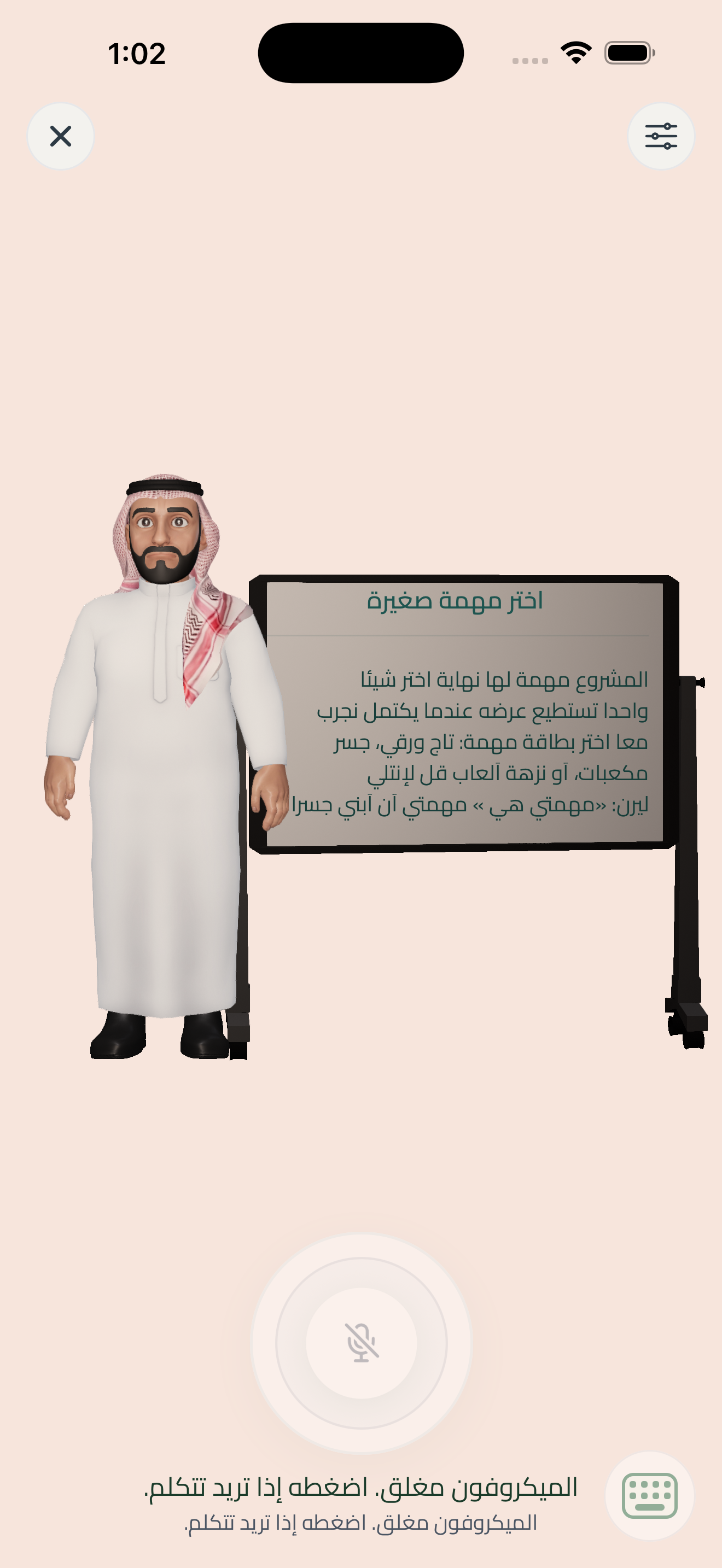
Take a closer look at a real IntelliLearn session screen, with an educator avatar, lesson whiteboard and voice controls. Imagine the question you would bring to your own lesson.
Explore the iOS app screens ↗Actual native screen · Test-account data · Captures come from different verified builds.